How to print 90-ball tickets
- Choose strips or single tickets. Strips of six are the classic format. Single tickets are handy when each player gets only one.
- Set how many. Pick the number of strips (or tickets). Each strip is one A4 page with six tickets.
- Create the PDF. Press Create, then Download PDF. A call sheet with 1 to 90 comes at the end.
- Call 1 to 90. Open the number caller and choose Numbers 1–90, or use the call sheet. UK-style calls such as “two little ducks, 22” are available in the caller settings.
Options explained
- Ticket format. Strips of six (every number once per strip) or single tickets.
- Number ranges in columns. 1–9, 10–19 … 80–90 is the standard layout. 1–10, 11–20 … 81–90 is also used.
- Tickets per page. 6 (one full strip) or 3 for bigger print.
- Paper. A4 by default for 90-ball; Letter works too.
- Card codes. Each ticket prints a set code and a ticket code, so the caller can check a claim.
Example
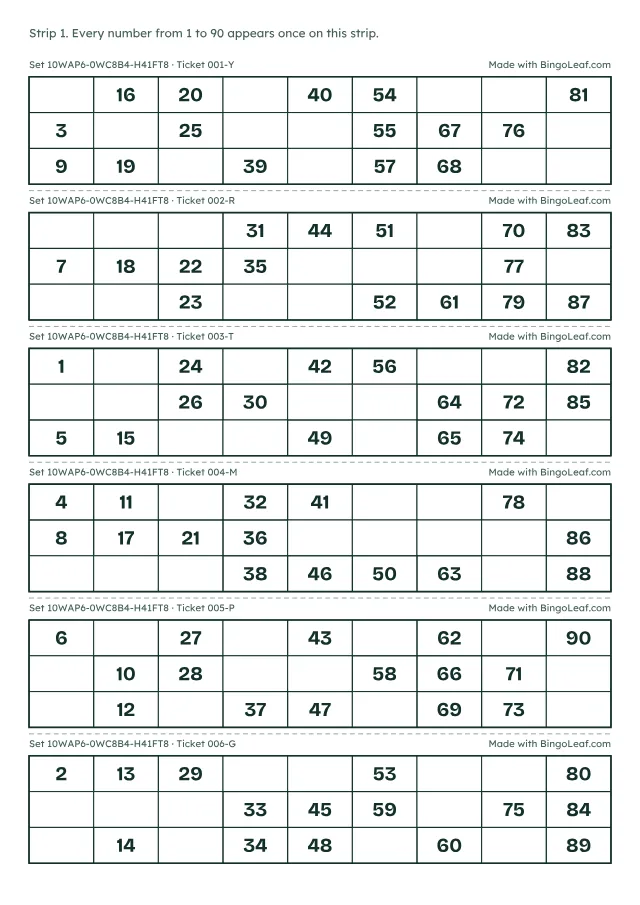
Every ticket follows the same rules: 3 rows, 9 columns, 5 numbers in each row, 1 to 3 numbers in each column and no empty column, with numbers rising from top to bottom.
Printing tips and limits
- Print at 100% so the tickets line up with the cut marks.
- Up to 100 tickets per PDF. For more, make a second set; each ticket’s set code tells the caller which set to check.
- Playing the American 5×5 game instead? Print 1–75 bingo cards.